Device Type:misc
Electrical Standard:global
Board:esp32
Difficulty:Plug-n-flash (2/5)
Project URL:https://github.com/glifocat/ed1-hoas
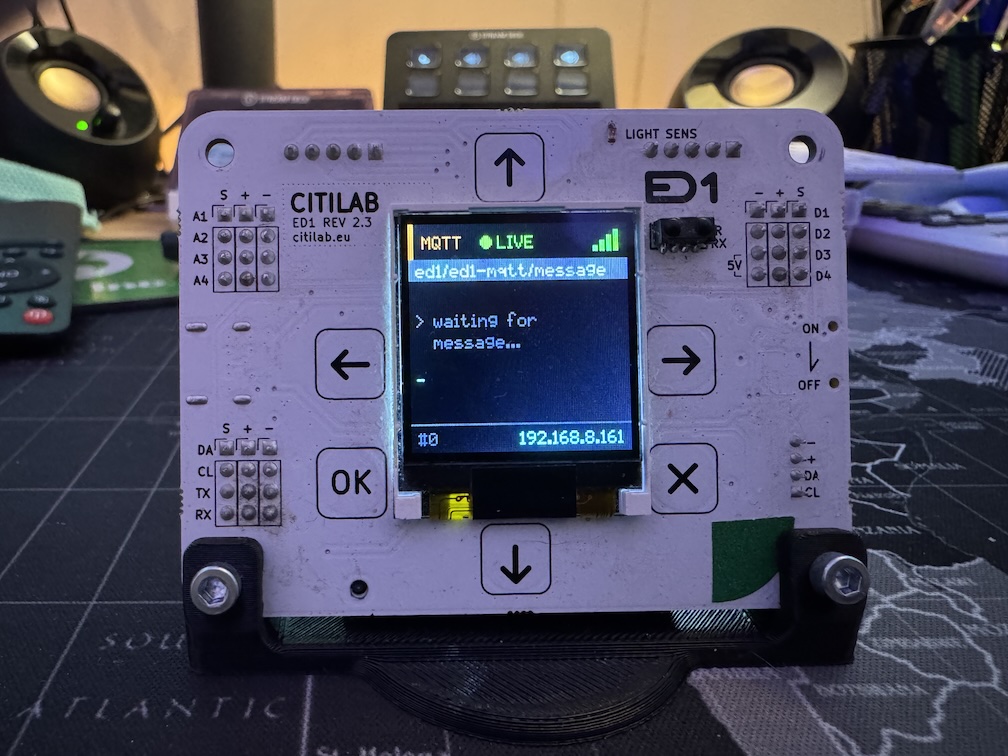
Citilab ED1
The ED1 is an educational development board based on the ESP32, created by Citilab Edutec. It is designed to teach embedded systems, programming, and IoT.
It features a built-in 1.44" TFT display, capacitive touch buttons, sensors (light, temperature), and expansion ports for controlling stepper motors (28BYJ-48) and WS2812 LED matrices.
Features
- MCU: ESP32-SIP (Dual-core 240MHz, WiFi, BLE)
- Display: 1.44" TFT LCD (ST7735, 128x128 pixels)
- Input: 6 Capacitive Touch Buttons (Up, Down, Left, Right, OK, X)
- Audio: Passive Buzzer with amplifier (PAM8301)
- Sensors:
- Light Sensor (ALS-PT19-315C)
- IR Receiver (38kHz)
- Internal Temperature & WiFi Signal
- Power: USB-C (5V) and Li-Ion Battery (16340) charger
- Expansion:
- Stepper Motors: I2C Expander (MCP23009) + ULN2004A drivers for 2x 28BYJ-48
- LED Matrix: Dedicated port for WS2812 32x8 matrix
- I2C/UART: Grove connector and pin headers
Configuration
The following configuration enables the display, buttons, buzzer, and basic sensors.
Note: For advanced features like stepper motors (which use direct I2C register manipulation via MCP23009) or complex display layouts, consider using external packages or custom components as seen in the project repository.
# ==============================================================================
# Citilab ED1 - Minimal ESPHome Configuration
# ==============================================================================
substitutions:
  name: ed1-board
  friendly_name: ED1 Board

esphome:
  name: ${name}
  friendly_name: ${friendly_name}
  name_add_mac_suffix: true
  project:
    name: citilab.ed1
    version: "1.0"

esp32:
  board: esp32dev
  framework:
    type: arduino

logger:
  level: INFO

api:

ota:
  - platform: esphome

wifi:
  id: wifi_component
  # Enable fallback hotspot (captive portal) in case wifi connection fails
  ap:
    ssid: "ED1-Fallback"

captive_portal:

# ==============================================================================
# Hardware Buses
# ==============================================================================

spi:
  clk_pin: GPIO18
  mosi_pin: GPIO23
  miso_pin: GPIO19

i2c:
  sda: GPIO21
  scl: GPIO22
  scan: true
  id: bus_i2c

# ==============================================================================
# Fonts (using Google Fonts - no external files needed)
# ==============================================================================

font:
  - file: "gfonts://Roboto"
    id: font_large
    size: 20
  - file: "gfonts://Roboto"
    id: font_medium
    size: 14
  - file: "gfonts://Roboto"
    id: font_small
    size: 10

# ==============================================================================
# TFT Display (ST7735 128x128)
# ==============================================================================

display:
  - platform: st7735
    id: internal_display
    cs_pin: GPIO5
    dc_pin: GPIO9
    reset_pin: GPIO10
    rotation: 0
    model: "INITR_GREENTAB"
    device_width: 128
    device_height: 128
    col_start: 2
    row_start: 3
    update_interval: 1s
    lambda: |-
      // Colors
      auto BLACK = Color(0, 0, 0);
      auto WHITE = Color(255, 255, 255);
      auto GREEN = Color(0, 255, 0);
      auto GRAY = Color(100, 100, 100);

      it.fill(BLACK);

      // Title
      it.print(64, 20, id(font_large), GREEN, TextAlign::CENTER, "ED1");

      // IP Address (if connected)
      if (id(wifi_component).is_connected()) {
         it.print(64, 50, id(font_small), WHITE, TextAlign::CENTER, id(wifi_ip).state.c_str());
      } else {
         it.print(64, 50, id(font_small), GRAY, TextAlign::CENTER, "Connecting...");
      }

      // Separator
      it.horizontal_line(10, 65, 108, GRAY);

      // Sensor readings
      if (!std::isnan(id(cpu_temp).state)) {
        it.printf(64, 75, id(font_small), WHITE, TextAlign::CENTER, "CPU: %.1fC", id(cpu_temp).state);
      }

      if (!std::isnan(id(light_sensor).state)) {
        it.printf(64, 90, id(font_small), WHITE, TextAlign::CENTER, "Light: %.0f%%", id(light_sensor).state);
      }

      // WiFi signal
      if (!std::isnan(id(wifi_signal_sensor).state)) {
        it.printf(64, 105, id(font_small), GRAY, TextAlign::CENTER, "WiFi: %.0fdBm", id(wifi_signal_sensor).state);
      }

# ==============================================================================
# Buzzer
# ==============================================================================

output:
  - platform: ledc
    pin: GPIO26
    id: buzzer_output

rtttl:
  output: buzzer_output
  id: buzzer

switch:
  - platform: template
    name: "Buzzer Test"
    id: buzzer_switch
    turn_on_action:
      - rtttl.play: "beep:d=4,o=5,b=100:c"
    turn_off_action:
      - rtttl.stop

# ==============================================================================
# Touch Buttons
# ==============================================================================

esp32_touch:
  setup_mode: false

binary_sensor:
  - platform: esp32_touch
    name: "Button Up"
    id: btn_up
    pin: GPIO4
    threshold: 500
    on_press:
      - rtttl.play: "beep:d=16,o=5,b=140:c"

  - platform: esp32_touch
    name: "Button Down"
    id: btn_down
    pin: GPIO13
    threshold: 500
    on_press:
      - rtttl.play: "beep:d=16,o=5,b=140:d"

  - platform: esp32_touch
    name: "Button Left"
    id: btn_left
    pin: GPIO2
    threshold: 500
    on_press:
      - rtttl.play: "beep:d=16,o=5,b=140:e"

  - platform: esp32_touch
    name: "Button Right"
    id: btn_right
    pin: GPIO27
    threshold: 500
    on_press:
      - rtttl.play: "beep:d=16,o=5,b=140:f"

  - platform: esp32_touch
    name: "Button OK"
    id: btn_ok
    pin: GPIO15
    threshold: 500
    on_press:
      - rtttl.play: "ok:d=8,o=5,b=160:c,e,g"

  - platform: esp32_touch
    name: "Button X"
    id: btn_x
    pin: GPIO14
    threshold: 900
    on_press:
      - rtttl.play: "alert:d=8,o=5,b=180:c,c,c"

# ==============================================================================
# Sensors
# ==============================================================================

sensor:
  - platform: wifi_signal
    name: "WiFi Signal"
    id: wifi_signal_sensor
    update_interval: 60s

  - platform: uptime
    name: "Uptime"
    id: uptime_sensor

  - platform: internal_temperature
    name: "CPU Temperature"
    id: cpu_temp

  - platform: adc
    pin: GPIO34
    name: "Light Level"
    id: light_sensor
    attenuation: 12db
    update_interval: 5s
    unit_of_measurement: "%"
    filters:
      - multiply: 30.3

text_sensor:
  - platform: wifi_info
    ip_address:
      name: "IP Address"
      id: wifi_ip
    ssid:
      name: "WiFi SSID"